
You’ve narrowed your next computer down to two options, and now you’re stuck. The mac computer vs windows debate isn’t just about brand loyalty anymore. It’s about matching the machine to how you actually work, what software you run, and how much you’re willing to spend to get it done right.
Here’s the direct answer: Mac wins on build quality and battery life, Windows wins on price flexibility and hardware choice. Beyond that, the right pick depends on your specific workflow, whether that’s video editing, gaming, coding, or basic office work, and which apps you can’t live without.
This guide breaks down the real differences that matter before you buy. We’ll compare performance benchmarks and pricing tiers across both platforms, look at software compatibility for common tasks, and cover upgradeability, security, and long-term support. By the end, you’ll know exactly which system fits your budget and your daily habits, not just which one has better marketing.
Why the Mac vs Windows choice matters
Switching operating systems isn’t like changing your phone case. Once you buy into an ecosystem, you’re committing to its file formats, its app store, its accessories, and often its cloud storage. Choosing between Mac and Windows early saves you from a painful mid-project migration where you discover your video editing plugins don’t exist on the other platform, or your favorite productivity app runs like garbage through emulation.
The real cost of picking wrong
Buyers often focus on the sticker price and skip the hidden costs of switching later. If you’re a freelance designer who buys a Windows laptop because it’s $400 cheaper, then realizes six months in that your client’s entire workflow runs on Final Cut Pro and Logic, you’re now paying twice: once for the laptop you don’t use, and again for the Mac you actually need. The same happens in reverse when Windows-only engineering software, like SolidWorks or certain accounting suites, forces a PC purchase after someone’s already invested in macOS.
Get the platform decision right the first time, because switching later costs more than the price difference between the two machines.
How the OS shapes your daily habits
Your operating system dictates far more than most people expect before they buy. It decides:
- Which apps you can install without workarounds or virtual machines
- How you manage files (Finder’s tag-based system vs Windows’ folder-heavy structure)
- What peripherals plug in cleanly (Mac’s limited port selection vs the wide range of Windows-compatible hardware)
- How your system updates and how much control you have over that process
- Which cloud and productivity tools integrate natively versus needing third-party bridges
Someone doing basic web browsing and email won’t notice most of these differences, beyond small things like the screenshot key combinations in macOS and Windows 11. Someone editing 4K video, running Docker containers, or gaming at 144fps will feel every one of them daily.
Long-term value and ecosystem lock-in
Think beyond the first machine you buy. Apple’s ecosystem rewards continuity: an iPhone user who buys a MacBook gets Handoff, AirDrop, and iMessage syncing for free, features that make the whole setup feel connected. Meanwhile, Windows offers broader hardware compatibility and works with almost any accessory, printer, or gaming peripheral you already own, without needing dongles or adapters. Neither approach is objectively better, but each pulls you deeper into its ecosystem the longer you stay, which is exactly why the mac computer vs windows pc decision deserves more thought than most people give it.
Understanding these stakes upfront matters because the wrong choice doesn’t just cost money, it costs time. Every hour spent troubleshooting incompatible software or hunting for a Windows-only driver on a Mac is an hour you didn’t spend actually working. That’s the real reason this decision matters more now than it did a decade ago: both platforms have matured to the point where the differences aren’t about which one "works" anymore. They’re about which one works better for your specific tasks, your budget, and the tools you’re already locked into. Getting clear on that before you buy is what the rest of this guide will help you do.
How to decide which platform fits your needs
Forget the brand debate for a second and start with what you actually do on a computer every day. The windows vs mac decision gets a lot simpler once you list your must-have software, your budget ceiling, and how long you expect the machine to last. Most buyers skip this step and end up picking based on what a friend uses or what looked cool in a store.
Start with your software, not the hardware
Open your current laptop and check what you actually use daily. If your work depends on Adobe Creative Suite, Final Cut Pro, or Logic Pro, Mac is the obvious lane. If you need AutoCAD, SolidWorks, or a specific accounting package that only runs natively on Windows, that decision is already made for you. Cross-check every major app you rely on against both platforms before you spend a dollar, because discovering an incompatibility after purchase is the single most expensive mistake in this whole process.
If your must-have software only runs on one platform, that’s your answer, stop shopping and buy accordingly.
Match your budget to your real needs
Money matters more than most guides admit. Windows machines span a huge range, from $300 Chromebooks to $3,000 workstations, so you can find a laptop on tight budget constraints that still handles your workload. Macs start higher and stay higher, but you’re paying for consistent build quality across the entire lineup, not a gamble on which $500 laptop actually holds up. Ask yourself these questions before comparing prices side by side:

- What’s the absolute most I’m willing to spend?
- Do I need a laptop, a desktop, or both?
- How long do I expect this machine to last me (2 years, 5 years, longer)?
- Am I buying for one specific task or general use?
Factor in your existing ecosystem
Consider what you already own. If your phone, tablet, and smartwatch are all Apple products, a MacBook slots into that setup with almost zero friction through iCloud, Handoff, and AirDrop. If you’re running Android, use a Windows PC daily at work, and have a house full of smart home gadgets built around Google or Amazon, a Windows machine keeps that continuity intact. Nobody wants to juggle two separate ecosystems just to get basic file sharing working between devices, or to relearn capturing screens across Windows, Mac, iOS, and Android, so let your existing hardware guide part of this decision too.
Key differences at a glance: performance, cost, and more
Numbers settle arguments faster than opinions do, so let’s look at where Mac and Windows actually separate on paper. The mac computer vs windows comparison gets clearer once you stop talking about brand feel and start looking at benchmarks, price tiers, and repair policies side by side.
Performance and hardware specs
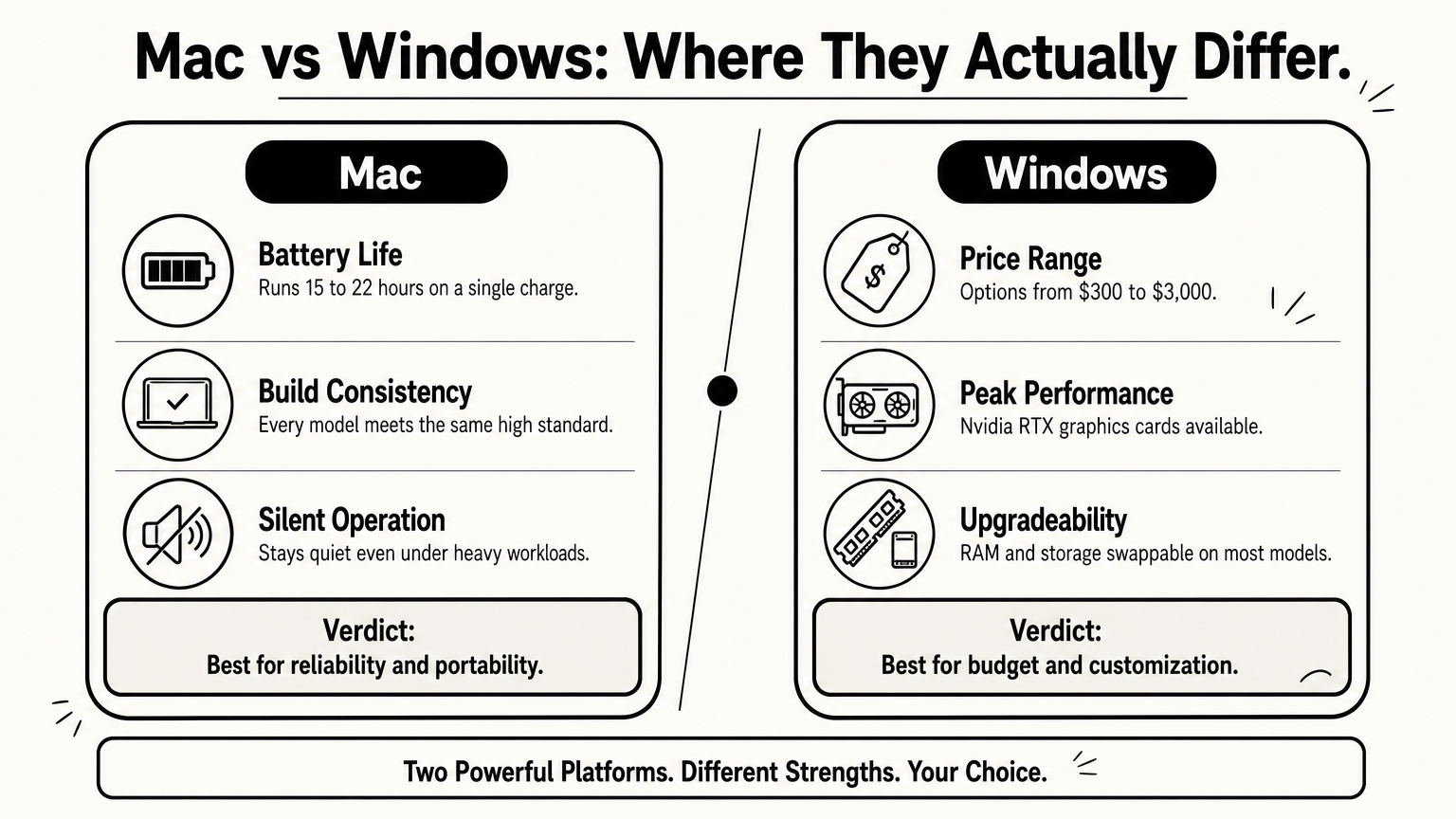
Apple’s M-series chips changed the performance conversation entirely. Apple silicon now beats most consumer Intel and AMD laptops on battery life and thermal efficiency, often running silent under loads that would spin a Windows laptop’s fans at full speed. Windows still holds the edge on raw peak performance for gaming and heavy GPU work, since Nvidia’s top-tier cards aren’t available on Mac at all.
| Category | Mac | Windows |
|---|---|---|
| Battery life | 15-22 hours typical | 6-12 hours typical |
| Peak GPU performance | Limited to integrated/M-series | Nvidia RTX options available |
| Fan noise under load | Minimal to none | Noticeable on most models |
| Starting price | ~$999 | ~$300-400 |
| Upgradeable RAM/storage | No (soldered) | Yes on most models |
Pricing tiers side by side
Windows dominates the budget end of the market. You can grab a functional Chromebook-style laptop for $300 or build a gaming rig for $800 that would cost double on the Apple side. Meanwhile, Mac pricing stays tighter across its whole lineup, starting near $999 for a MacBook Air and climbing from there, but you rarely find a genuinely bad Mac the way you can stumble onto a genuinely bad $350 Windows laptop.
Windows wins on price flexibility, Mac wins on consistency, and neither claim cancels the other out.
Upgradeability and long-term support
Repairability is where the two platforms diverge hardest. Most modern Macs solder RAM and storage directly to the logic board, so what you buy is what you keep for the machine’s life. Windows laptops, especially from brands like Dell and Lenovo, still let you swap RAM, upgrade SSDs, and replace batteries without a trip to a specialty repair shop. Support windows matter too: Apple typically provides macOS updates for seven to eight years after release, while Windows PC longevity depends heavily on the manufacturer and specific hardware drivers, which can lag behind Microsoft’s own OS update schedule.
Which platform wins for common use cases
Generic advice falls apart once you look at specific tasks, so let’s break down the mac vs windows for gaming question alongside creative work, coding, and everyday office use. Each category has a clear winner once you stop comparing brands and start comparing what actually gets the job done.
Creative work and content creation
Designers, video editors, and musicians lean toward Mac for good reason. Final Cut Pro, Logic Pro, and the tight integration between macOS and Adobe’s Creative Cloud make color grading, audio mixing, and rendering feel smoother, especially on Apple silicon chips that handle export queues without throttling. Windows still works fine for creative work through Premiere Pro and DaVinci Resolve, but you’ll need a beefier GPU to match what a Mac does with less raw hardware.
For creative professionals, the software ecosystem matters more than the spec sheet.
Gaming and heavy graphics work
Gamers should skip Mac entirely. Nvidia’s RTX cards, the backbone of modern PC gaming, don’t exist on Apple’s lineup, and most AAA titles launch on Windows first or exclusively. Windows also supports easier hardware customization, letting you swap graphics cards and add RAM as new games demand more power, something a sealed Mac simply can’t do.
Coding and development
Developers split down the middle depending on their stack. Mac’s Unix-based terminal makes it a favorite for web developers, iOS engineers, and anyone running Docker or working across Linux servers. Software teams building for Windows-specific enterprise environments, or using Visual Studio’s full feature set, get a smoother experience staying on Windows.
Everyday office and student use
Office work rarely justifies premium hardware. Word, Excel, Zoom, and browser-based tools run identically on both platforms, so budget usually decides this one. Students and general users often do better with an affordable Windows laptop, since:
- Entry-level Windows laptops start around $300-400
- Office suites and cloud tools work the same on both systems
- Repair shops for Windows hardware are far more common on campus and locally
Quick reference for the categories above:
| Use Case | Better Platform |
|---|---|
| Video/audio editing | Mac |
| Gaming | Windows |
| Web/mobile development | Mac (slight edge) |
| Enterprise software dev | Windows |
| Office/student work | Windows (budget) |
Finding the right fit for your workflow
Neither platform is objectively better, and anyone telling you otherwise is selling something. The mac computer vs windows decision comes down to what you actually run daily, what you can afford, and how much control you want over your hardware. Video editors and musicians lean Mac. Gamers and budget-conscious buyers lean Windows. Everyone else lands somewhere in between depending on their existing gadgets and their tolerance for tinkering.
Go back to your software list before you shop. Check prices against your real budget, not an idealized one. Factor in the ecosystem you already own, because that friction is real once you’re living with the machine daily. Skip the brand loyalty and buy the tool that fits your work.
Want more practical comparisons like this before your next tech purchase? Start with our full breakdown of which computer to buy, a Mac or a Windows PC, and make your next decision with confidence instead of guesswork.